 edpaffjr.com
You may have noticed that my website was down last week. For the last couple of weeks I have had intermittent service interruptions from my Internet service provider (ISP). I also experienced a hardware failure with my very old router last Sunday and had to replace it with a new device. Once that was up and running I had some issues with my ISP who didn’t appear to fully recognized my new hardware and were blocking some incoming connections. After multiple failed attempts at contacting them to get the issues corrected, I finally decided to switch ISP’s. Time Warner came out and hooked up our new service over the weekend and now I am up and running once again! I promise more updates starting tomorrow with details on all the things we have done while our Internet has been down.
Archive for the 'Tech' Category
Yesterday my sister-in-law asked if she should upgrade to the latest iOS 7. I told her that she absolutely should, but as always make sure to do a backup to iTunes before upgrading. I’ve been using iOS 7 since a day or two after its release and have had a wonderful experience with the redesigned user interface.

iOS 7 On My iPhone 5
I did notice one very small issue today. Somehow my phone has downloaded the same exact app twice. I’m clueless as to how it happened since I haven’t tried to download or update any applications since the upgrade. However, I do love the new automatic application updates, easily my favorite new feature behind the control center. Control center allows me to easily turn on and off my WiFi connection and easy access to other common things that were buried in Settings.
The one built-in application that seems to have changed the most is the calendar, and I’m still trying to get used to the new layout, but I honestly don’t use it too much on my personal phone. It seems like it is now designed much more for business purposes, so maybe it will be nice once I am able to upgrade my work phone, which I hope isn’t too far away. Switching between different operating systems is a bit challenging, especially when they are so different.
Ever since my beloved Sennheiser CX 300 headphones started showing their age a few months ago, I’ve been on the lookout for a nice pair of noise isolating in-ear headphones with iPhone controls to replace them. My CX 300’s were around six years old, and while the sound was still amazing (when both headphones would work), I missed the iPhone controls from my Apple EarPods that came shipped with my iPhone 5.
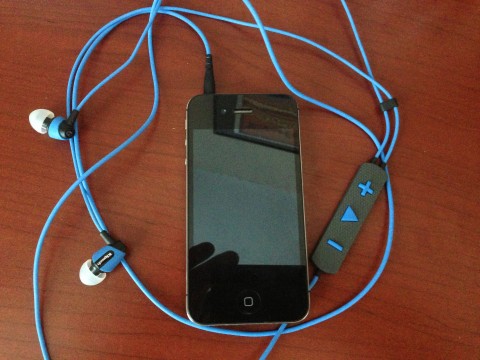
Bright Blue Headphones
While browsing through my RSS feed (yes I am still using RSS) last week I found a great deal on a pair of Klipsch Image S4i Rugged Headphones for $40 shipped. These have a list price of $100, so it was just the kind of deal I was looking for. They arrived this past Sunday and I have been using them ever since. The noise isolation from the earbuds is definitely on par with the old Sennheiser’s and the sound is just as good if not better. It’s all a matter of finding the right size tip for your ear. If you can find a deal on these headphones, definitely give them a try.
While at the Bunbury Music Festival last month, I won a GoPro HERO3 video camera thanks to Education at Work. EAW  is a non-profit organization helping to address the unemployment crisis in the U.S. They provide entry-level service positions that teach “foundational” job skills like time management, communication, collaboration, problem solving and critical thinking. Please visit their website for additional information.
Back to the GoPro, I finally found some time this weekend to give it a try. We spent the majority of the weekend down at Williamstown Lake. My first video is a quick tour of part of the lake from the pontoon boat. As it was my first attempt, please forgive my fingers that are blocking part of the view.
The second video shows a human sized gerbil ball. Since the camera has a waterproof housing I took this video while floating in the lake. I took my turn in the gerbil ball but did not take the camera inside as I was afraid of dropping of it.
I’m in the process of buying more accessories for the GoPro, starting with a floating tether to keep it floating in the water should I accidentally let go of it. I think some kind of mount would be cool too, but I haven’t made any purchases yet.
Last month I posted about a new vacation rental website called Dwellable. My blog quickly rose to the top of their leaderboard and I was featured in an interview on their website. Though I have yet to use their service to plan any vacations, my blog posts are linked all over their website. My travel plans are taking a back seat until after our second child is born in less than a month. Once our trip planning picks back up I’m sure I will start using Dwellable even more, especially now that they have a beautiful iPhone and iPad app.

Where Are You Going
When the app is first launched the prompt is simply, “Where are you going?” When this is clicked a list of popular travel destinations immediately displays or you can simply type your desired location, whether that be a particular city or an entire state. The background of the launch page is a soothing ocean scene with a looping wave splash. One thing I did notice is that launching the app does stop my background music from playing. That is something that should be fixed as I find it nice to listen to music when making plans.
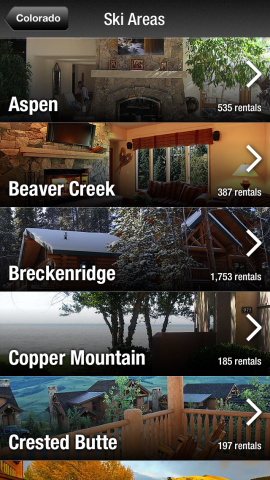
Colorado Ski Areas
Say you are planning a ski trip to Colorado. Well you can easily view the number of rentals in each of the locations along with a featured image of one of the vacation rentals. You can then select each ski area and see a list of available vacation rental properties. A filter page is available to select certain criteria for your search and a date planner is also available. It doesn’t appear that all the properties have their available dates posted, but I’m sure that will only get better with increased use.
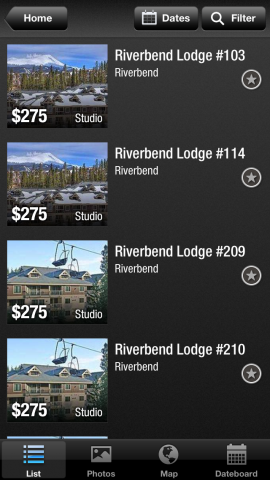
Property Listings
Dwellable reminds me most of vacation rental website VRBO but the two are very different. I’ve always found VRBO to be lacking search filters and overall it is very ugly and cumbersome to use. Dwellable’s app and website are much more visually appealing and the filters are well designed. Last October my mother planned a large family trip to Hilton Head for later this summer. I helped with the property search using VRBO and we struggled to find the right size rental, on the beach, with a pool and hot tub. Look how easy it would be with Dwellable’s filters!
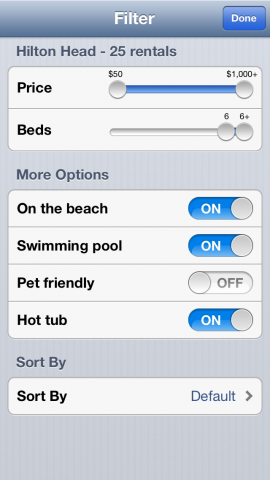
Search Filters
We are taking a last-minute trip to French Lick, Indiana this weekend. I used the app to try to find a vacation rental but there was only one result and it didn’t fit our needs. Again, I think the amount of properties available will only increase over time, but it is limiting currently. It would also be nice to see the blog posts that are featured on their website somehow integrated into the app as well. Overall I’m very impressed with Dwellable’s search capabilities and can’t wait to use it more for vacation planning.
Awhile back I posted that our Jetta had finally crossed the 100,000 mile mark. It was at that time that I was alerted to a piece of maintenance that we had neglected to have done, replacing the timing belt. I believe it is recommended to be replaced at 60-100k, so we were well overdue.
After talking it over with my dad, it was decided that replacing the belt was more work than we wanted to take on ourselves (with him doing the work and me mostly supervising). So I made a few calls to area service shops and even a dealership to get quotes. A couple of places, the dealership included, gave me a roughly $750 to $800 quote for the work (replacing belt and tensioner along with water pump, serpentine belt, and replacing the coolant). The last place I called, Dubwerx, wanted to see the car before providing a quote.
So I drove the car down to them a couple of Fridays ago for them to take a look at it. After an hour or so inspection I was given their price for the same replacement service the other guys offered, but their price was only $670. Since they work only on Volkswagen and Audi cars, I guess they are able to perform the job quicker than others and do it at a lower cost. My decision was made immediately and I scheduled an appointment to have the replacement done.
We dropped the car off to them last Wednesday evening so they would have it first thing Thursday morning. About 4pm on Thursday I got a call from the service director telling me that it would be done and ready for pickup before their 5:30 closing. I asked if I could leave it again overnight and pick it up on Friday morning, which was not an issue. The car was running great (just as it was) after picking it up the next day. I experienced wonderful service at Dubwerx and I will not hesitate to take my car back to them in the future.
I’ve been rocking the iPhone 3GS for well over 3 years. I passed on the iPhone 4 and then the 4S, but once the iPhone 5 was announced I knew I had to have it.
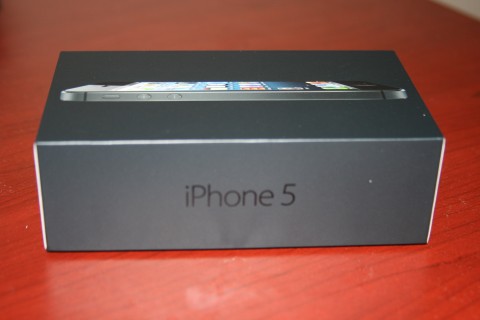
iPhone 5 Packaging
Many have said that it isn’t much different from the now discounted 4S (and free with contract iPhone 4). The feature I had to have was the larger screen. I feel that with the increased space there are things that the older hardware won’t be able to do. It also can’t hurt to have a faster 4G network (though not in Cincinnati on AT&T yet) as well as the updated A6 chip.
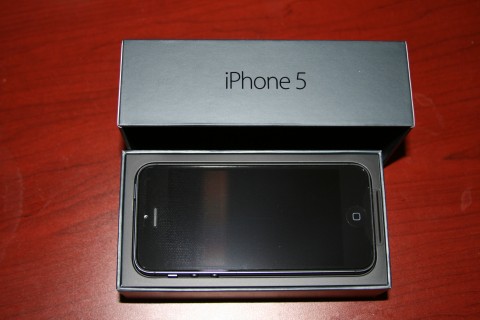
Open Box First Look
Another common argument against the phone is the new Lightning power/syncing cord. While it is true that I will likely need to purchase another one or two of these new cables, I will not have to buy the adapter they are selling for the older style docking devices. I’ve never owned any of these devices, so one less thing to worry about.
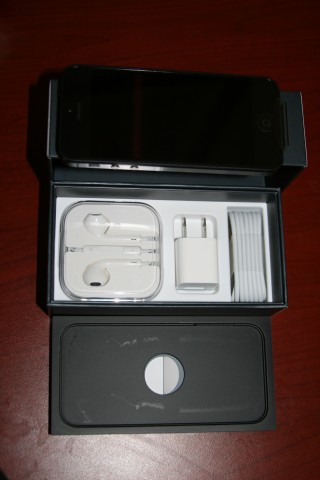
In Box Accessories
An added bonus to the deal are the new headphones. While I do own a pair of noise canceling earbuds that offer premium sound, the changes Apple has made to their included earbuds sound quite nice. Plus they included a carrying case, which I feel should always be true.
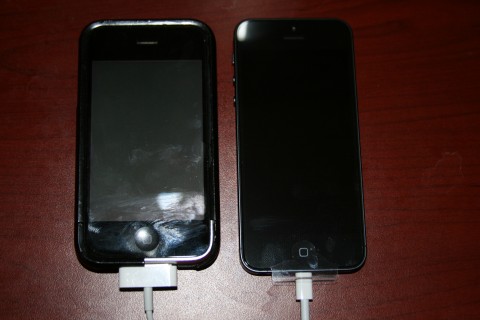
3GS vs 5
So long 3GS, it was fun while it lasted. I’m not getting rid of the old phone, as I can still keep it around and use it on Wi-Fi networks, just like an iPod touch. I figure I’ll get the most use out of it as an easy way to play my entire iTunes library throughout the house.
In case you missed it this morning, SpaceX’s Dragon capsule became the first commercial spacecraft to dock with the International Space Station. A recap of the events can be viewed in this video. It’s well worth taking the 10 minutes to view this history in the making.

We got a Dragon by the tail.
A week ago Microsoft announced that it would start automatically upgrading its Internet Explorer browser next year. For anyone who has tried to design and support even a basic website across the plethora of available browsers, this should come as great news. Internet Explorer version 6, which is still widely used, is the hardest browser to support and it often has to have code designed specifically for it. This browser is ten years old and desperately needs to be retired. The current version released earlier this year is version 9, so it’s easy to see why the upgrades are necessary. If you are still using IE6, do yourself (and web developers everywhere) a favor and download the latest version. Or better yet, switch over to Chrome, my preferred browser.
This past Saturday was a big day for my blog. Ten years ago I started my online journal as a fun-loving twenty-one year old student just starting my forth year of college. It is really hard to believe that I have been blogging for over 10 years now. Though the updates back then were often monthly, I’ve settled into a nice pattern of daily updates that allow for a quick break during the work day. I’m thankful for everyone who continues to stop by, some on a daily basis and others just from time to time, giving me another reason to write. Here’s to 10 more years!